Why You Don’t Have to Minify JavaScript Code in React Native Apps

If you’re coming from a web development background, you may be familiar with the common wisdom that “the less JavaScript, the better”, especially for performance. To reduce the size of JavaScript, web developers typically will use specialized tools called “minifiers”; the most popular one being Terser.
Such tools hook into the bundling pipeline and convert readable JS into a gibberish mashup of single-, double-, and sometimes triple-character tokens, such as a, __p, or b2, while preserving the code’s behavior.
export function add(left, right) {
  const result = left + right;
  return result;
}
add(2, 3);
JavaScript source code. Size: 95 characters.
export function add(d,n){return d+n}add(2,3);Minified source code. Size: 45 characters.
The result? Code that’s smaller by even up to 10%-50%. The same tools may often perform dead code elimination (DCE), looking for “dead code” branches, such as those for a “development” environment, but only when our code is intended for “production”.
However, React Native is different. You’ll see that the minification is turned off by default, even in production builds.
Why? The answer is: Hermes.
Hermes dead code elimination
Hermes is a JavaScript engine built for mobile, and React Native apps specifically. It’s the default since 2022 and it was a game-changer for mobile app performance, increasing startup time by up to 40% and reducing memory consumption significantly, while only adding ~2MB to the app bundle.
The interesting thing about Hermes is that when it’s properly configured, it will not run JavaScript directly, but bytecode (or Hermes Bytecode to be exact), which is partially responsible for the perf gains. This has some exciting implications, because the sheer size of our JavaScript doesn’t matter as much, as long as it produces a similar bytecode size. As a result, the React Native team decided it was not worth running extra optimizations in the bundling pipeline, so they removed it.
// https://github.com/facebook/react-native/blob/670a4d942f5eb5c6d406effcd84360958305056b/packages/gradle-plugin/react-native-gradle-plugin/src/main/kotlin/com/facebook/react/TaskConfiguration.kt#L84
// react-native/packages/gradle-plugin/react-native-gradle-plugin/src/main/kotlin/com/facebook/react/TaskConfiguration.kt
task.minifyEnabled.set(!isHermesEnabledInThisVariant)

// https://github.com/facebook/react-native/blob/670a4d942f5eb5c6d406effcd84360958305056b/packages/react-native/scripts/react-native-xcode.sh#L140-L143
// react-native/packages/react-native/scripts/react-native-xcode.sh
if [[ $USE_HERMES != false && $DEV == false ]]; then
  EXTRA_ARGS+=("--minify" "false")
fiMinification of the source JavaScript is skipped because the Hermes compiler natively performs all necessary optimizations. During the build stage, the compiler applies dead code elimination techniques when generating the final bytecode, which makes a separate minification step redundant and significantly speeds up the build process.
For example, you can see the comparison of Metro bundle sizes using the Expensify app as a real-world test case here.
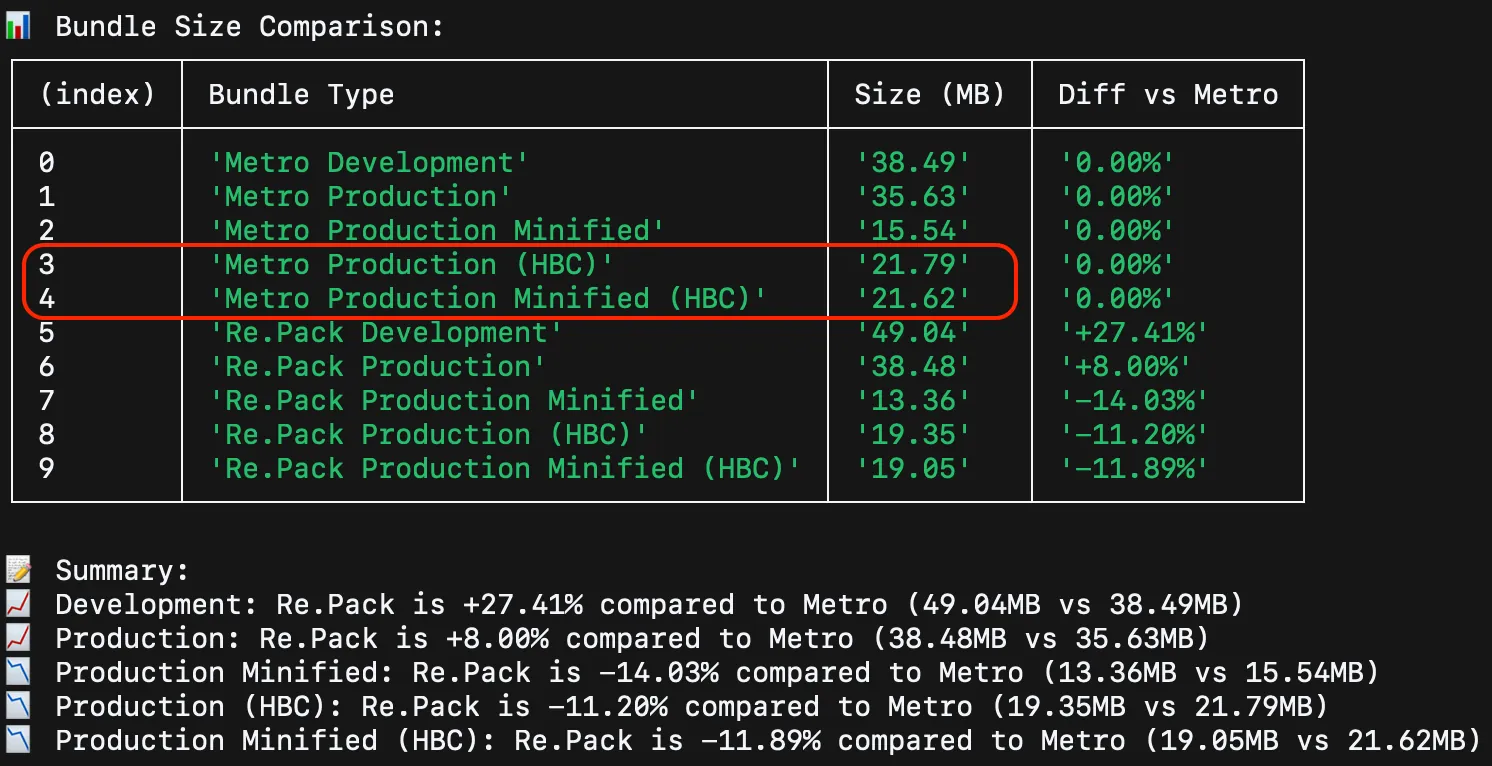
The observed difference is minimal: 21.79 MB vs 21.62 MB.
Verifying the dead code elimination
How can you verify that your dead code was actually eliminated by the Hermes compiler? You want proof that those unused functions or branches aren't sneaking into your production bundle.
The solution is to use a decompiler to transform the Hermes bytecode (.jsbundle, .bundle files) back into readable JavaScript (.js file). This output allows for direct inspection of the final, processed code, confirming successful dead code elimination by the Hermes compiler.
Quick guide: Decompiling hermes bytecode with hermes-dec
The following steps will guide you through installing and running the powerful hermes-dec tool to inspect your compiled bundles.
Step 1: Install pipx (If necessary)
pipx is a tool to install and run Python applications in isolated environments, making it ideal for the hermes-dec utility. If you don't have it, use Homebrew to install it:
brew install pipx
Step 2: Install the hermes-dec decompiler
Use pipx to install the decompiler directly from its Git repository:
pipx install git+https://github.com/P1sec/hermes-decStep 3: Run the decompiler on your bundle
Execute the decompiler, pointing it to your main Hermes bundle (typically ending in .jsbundle for iOS or .bundle for Android) and specifying an output file.
~/.local/pipx/venvs/hermes-dec/bin/hbc-decompiler path/to/main.jsbundle result.jsOnce the process is complete, you can open result.js and manually inspect the JavaScript to confirm that the code you expected to be eliminated is, indeed, gone!
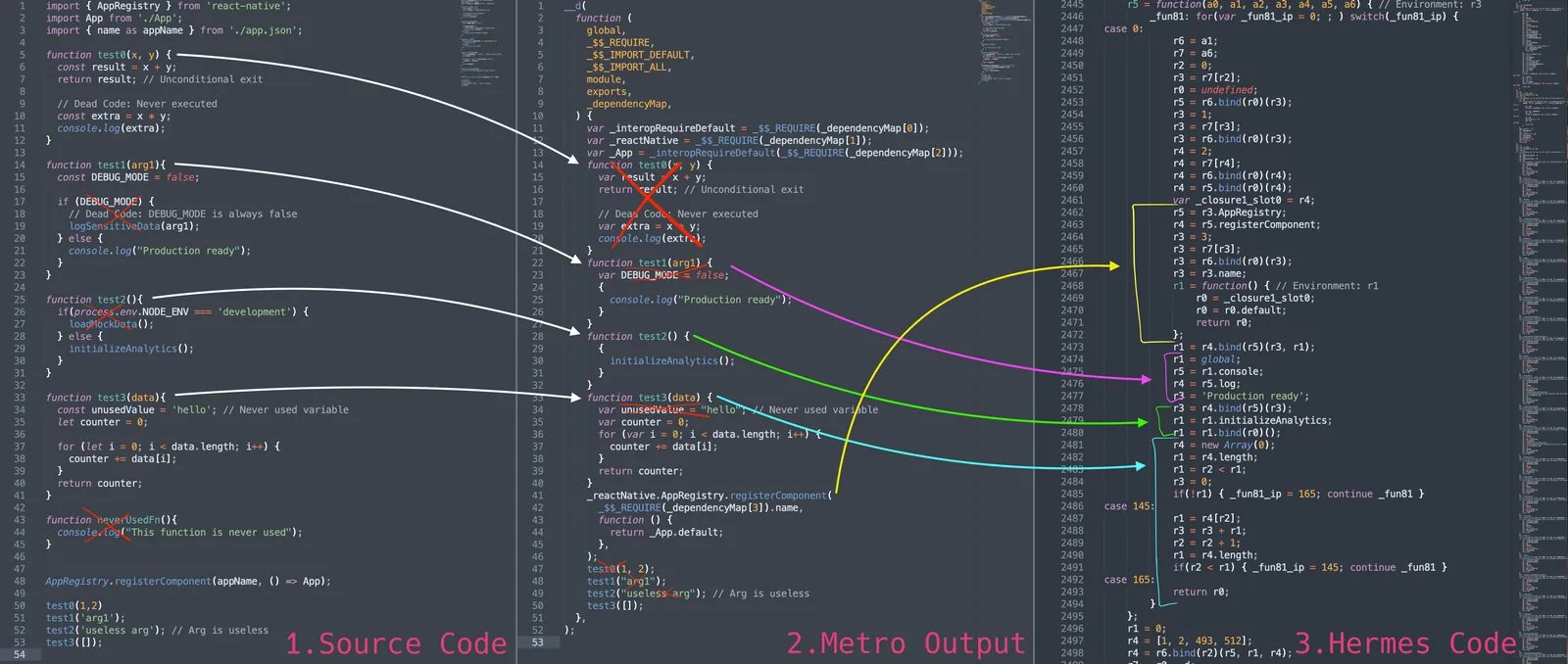
This quick check can save you hours of debugging and gives you concrete proof of Hermes's dead code elimination capabilities, ensuring your React Native bundles are as lean as possible.
Conclusion
It’s easy to take some optimizations for granted. And in React Native apps, we have a few layers of tools that perform their own optimizations. We believe it’s worthwhile to understand the whole pipeline, and only do the work where necessary. After all, there are differences between React on the web and React Native, with Hermes as a JavaScript engine being one of the bigger ones. Enjoy hacking around it!



Learn more about Hermes
Here's everything we published recently on this topic.